I remember now, the issue with immediately killing the tracking as soon as it fails is that it breaks when the object is temporarily occluded, for example an arm or leg passes in front of it. The idea was that when this happens it keeps looking and when the occlusion is over it might recover the tracking by itself if it's still inside the search window.

What I would like to do is add an option somewhere to tell how many frames of failed tracking are allowed before the playback is stopped. 3 or 4 frames should be a good default I think, but if you want you could set it to 1 and get the same behavior as in Tracker.

Or maybe playback should always stop on failure and it's the track that is force-closed after n failures.

I'm not reproducing the problem at the moment. Can you add more details or send a file?
Just to confirm, you are talking about individual trajectory objects, correct?
How many trajectories are there in total?
Are they starting at the same time or later in the video? Do they overlap?

It should be possible to make the audio trigger add a key frame. Then we can jump between key frames using a keyboard shortcut or button. The key frames could be on the ball impact or moved back to the start of the swing based on the delay value. The swings would not be neatly separated into their own "clips" though, so playback would just continue into the next swing. I experimented with a multi clips system at some point but didn't go too far.

I have been using the recording delay with audio trigger and that works fine but I would rather view my swing stance/setup/other variables in real time without the 2-3 second delay needed to capture the entire swing. from the audio trigger.

You can switch between real time and delayed using the third button in the recording toolbar, the blue circle with dots around, next to the "pause" one. It will turn orange when the view is live. This is independent from recording settings, it's just for the preview.

Also - would be nice to have an option for a counter for the recordings as opposed to date time, a date + counter would be easier to reference.

Yes. One difficulty with counters is that if they are global it makes things a bit complicated when using multiple capture screens or instances, and it's hard to know if it should increment after each capture or only after each global trigger, and how to let the user reset it.

You could sort of do it manually right now with a context file with one number per line. You would need to manually click on the next number from the drop down though.

If you see the "Device property pages" button at all it means it's not using the GenICam plugin but the DirectShow one to connect to the camera. This probably doesn't work with ROI as the stream formats in DirectShow are always full size. If you see two entries for the camera try the other one. There might be a conflict if it tries to load the camera through both at the same time usually I have to exclude the DirectShow ones by hand. I need to add more options related to this.

I can't access huateng website right now for some reason. The thing to look for is when they install the driver or runtime, if they are installing .cti files somewhere and updating the environment variable.
To verify, go to Windows settings > environment variables > and in the System variables list at the bottom there should be a GENICAM_GENTL64_PATH. Double click it and see if there is an entry for huateng software in there. It should point to a path that contains the .cti files. (All of this is standard and should be set by the vendor software).

You can also activate the debug logs from the help menu and then restart and in the logs there should be an entry when it tries to load the GenTL provider. This may be a bit cryptic you can send me the logs if you want and I'll have a look.

If you can share the video privately it would be great to see where it falls short to improve the algorithm or the experience.

The core tracking algorithm in Tracker and Kinovea are fairly similar. They are both based on tracking a template inside a search area and update the template based on some heuristics.

Depending on the failure case you might try different values for the match and update thresholds. This is how Kinovea controls template update (Tracker uses different mechanics with "evolve" and "tether").

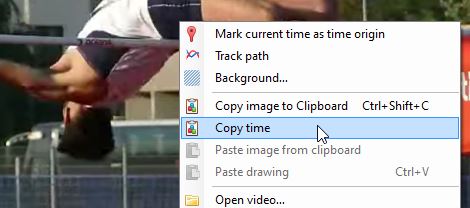
For example if it gets the wrong marker too often you can increase the "match threshold". When it fails and you replace it manually it will reset the template.

I see now that it doesn't actually stop the playback when it looses tracking, I agree it probably should, I think this behavior was changed at some point. I'll fix that or at least make it an option you can toggle on/off.

You can also increase the update threshold to 0.85 or 0.90, if the tracked object visually changes a lot this will update the template more often and can improve things.

One of the most important thing is that the object window, which defines the template, should be as tight as possible around the physical marker to avoid picking too much background (but still have some details in it). The search window should be large enough to cover marker motion but not too large that it might get confused with another marker.

A round shaped marker will work better (in both software) because an "X" shape will vary under rotation. (we don't look for the rotated template, only slide the template inside the search area and compute a score based on pixel correspondences).

If you can share the video with me I would love to test it.

It sounds like a bug. I will try to reproduce it. If you can share a real world file with me at joan at kinovea dot org it would be great, to make sure the fix works.

7

(15 replies, posted in General)

A big change related to tracking is that when you turn on tracking on an angle it now creates 3 individual track objects. The angle object is "attached" to the tracks but apart from that the tracks are relatively independent from it. For example if you delete the angle the individual tracks are not deleted.

If you double click on the search rectangle of one of the track it will open the right-hand side pane on the Tracking tab. There at the top it will say something like "Angle 1.a" or "Angle 1.b", that's the name of the track. You can click on another track and it should switch to it. From this panel you can change the search window and object window sizes individually for each track (this wasn't possible before).

Previously the tracking of angles and other objects like line, human model, etc. was using its own code and was less accurate and less configurable than bare tracks. Many people used multiple track objects to emulate this (from right-click > Track path). Now the two systems have been unified. Tracking on objects is now basically a shortcut to manipulate the attached tracks at once. This means you will also see the "trace" of each point because it's drawn by the tracks.

There are probably more options that should operate on all tracks at once. The tracking menus when you right click a track are for that track alone. The tracking menus when you right click the angle are for all the attached tracks (start/stop, delete end of tracks, and delete tracks).

I am not sure what you mean by "It picks one, and that's the only marker I can alter.". If your experience is not as above please link to a screenshot or describe the unexpected behavior.

Is it specifically about the motion synchronization option? I haven't worked on this mode for a while and it was experimental, I'm not sure it works very well. I do think it's an interesting feature to have but it might be broken right now.

I don't think this mode is documented at all, what made you select it?

To recap, the motion synchronization mode is intended to be a two-point synchronization. Instead of synchronizing the videos on one event it synchronizes on both a start and an end point, and forces one of the video to run in slow motion. The end point is based on the end of the working zone.

In the context of golf you could place the start point (normal sync point via time origin) at the very begin of the swing and the end point (end of working zone) at impact or at the end of the follow-through.

This requires manually setting the start and end point so in an automated capture and replay context I'm not sure it is that useful. With audio trigger the main sync point should be at impact in each video instead of the start of the swing. Maybe you didn't mean to use this mode in the first place?

9

(25 replies, posted in Cameras and hardware)

Normally you shouldn't need to copy the .cti files into the GenICam folder of Kinovea. When you install the GenTL provider of a given vendor like FLIR it will add itself to the environment variable GENICAM_GENTL64_PATH. You can check in the system environment variables if it correctly added its path there.

10

(3 replies, posted in General)

Thanks. Sorry I was confused for a bit because the human model tool is not actually configured to be trackable.

If I understand correctly what you have done is created separate tracking points for each joint and also added a human model object on top. Indeed the "linking" doesn't work like that, sorry for the confusion. If you test with a simple line or angle drawing you can see how it is supposed to work: you add the line or angle object, right click, and select the menu "Tracking > Start tracking". This will create all the individual tracks for the points automatically. This doesn't work with the human model because its points are not marked as trackable, mainly because it creates a big mess which is almost impossible to work out manually.

If you want to try anyway, I uploaded a version of the human model tool that has all the points trackable here:

https://kinovea.org/tools/extra/human-m … 0model.xml

Download this and replace the file in under: DrawingTools\Custom\10 - Human model.xml

If you use the installer version the file is under "Program files\Kinovea\DrawingTools\Custom" folder and if you use the portable (.zip) version, the file is in the "DrawingTools\Custom" folder. You need to close and restart Kinovea for this to take effect.

After that you can start tracking the human model. The tracking tab on the annotation pane on the right hand side has more options for the size of the search box and tracking parameters. Now any movement of the points should update the center of mass.

I know it's not a great solution that's why I want to integrate Sports2D more tightly.

This setting has moved to be directly in the capture screen, to the right of the delay slider. The one with the little STOP icon next to it. I'm still in the process of updating the user manual, hoping to finish somewhere in January.

12

(3 replies, posted in General)

There is no integrated automated way. There is a very manual way where you add a human model drawing object and track it over time but you would have to place joints manually because with full body tracking there is always something occluding some points.

The more automated way is via Sports2D here: https://github.com/davidpagnon/Sports2D

Kinovea can read the files from Sports2D if they are created with the right options, I'm planning on improving this integration more in the future. In the meantime if more people could try Sports2D and report their experience it would be helpful. I think the installation process could be streamlined for non-developers and non-researchers. Right now I think you need to either use google Colab or install python and call it from the command line. Check this tutorial: https://www.youtube.com/watch?v=Er5RpcJ8o1Y

edit: inside Kinovea only the built-in human model has the center of mass, the model used to import Sports2D data files doesn't calculate the center of mass, something to add in the future.

13

(2 replies, posted in General)

I'm not sure but it might be related to a change in how the videos are loaded specifically in the case of instant replay / observer. Because in this case the goal is normally to load the videos as fast as possible for instant feedback it no longer tries to load the individual frames in memory, as this could cause a big delay. The observer mode tries to stay as lightweight as possible during loading.

See if clicking once on the "reset working zone" button triggers a reload of the working zone into memory. (The blue leftward arrow).

14

(15 replies, posted in General)

Ah, I see. In 2026 I plan on updating to a recent version of FFMpeg libraries and add a function to encode exported video with different codecs. Also I could add an output size option on the dual export dialog.

15

(15 replies, posted in General)

That's quite strange, it should be completely uncorrelated as the frames are generated one by one and the frame rate is stored as metadata. Does it do it with all image sizes? Is the resulting file playing slowly compared to its nominal frame rate or the stored frame rate itself is slower than expected? Like if you open the file in another player what does it say the frame rate is?