
Can you be a bit more verbose, I don't understand what you are referring to… 
1,591 2010-10-05 20:17:08
Re: Continous playback in slow motion (3 replies, posted in General)
1,592 2010-10-01 21:17:21
Topic: Version expérimentale - 0.8.10 (6 replies, posted in Français)
Version expérimentale : elle a besoin de vos retour d'expérience pour s'améliorer !
L'installeur est [s]dispo ici[/s]. Voir topic 0.8.11
Nouveautés principales de cette version :
Outil cercle
En cliquant sur un cercle ajouté, vous verrez un changement de couleur sur une portion du cercle en bas à droite. Vous pouvez faire glisser cette zone pour changer la taille du cercle.
Représentation du temps "Total en millisecondes"
En plus de la notation classique ou du "numéro des images" vous pouvez maintenant utiliser cette représentation purement numérique.
Correctifs : bugs 214, 220, 221.
Des correctifs ont été apportés dans l'écran de capture, mais le clignotement de l'image pendant l'enregistrement (Windows Vista et 7) est toujours présent.
Utilisateurs de Windows 7 : si vous avez activé une des options "moyen - 150%" ou "grande - 200%" dans le "Panneau de configuration > Affichage" vous constaterez des soucis au niveau de l'interface graphique. La correction est en cours, en attendant le seul contournement connu est de rebasculer en "petite - 100%".
Capture d'écran : quelques cercles.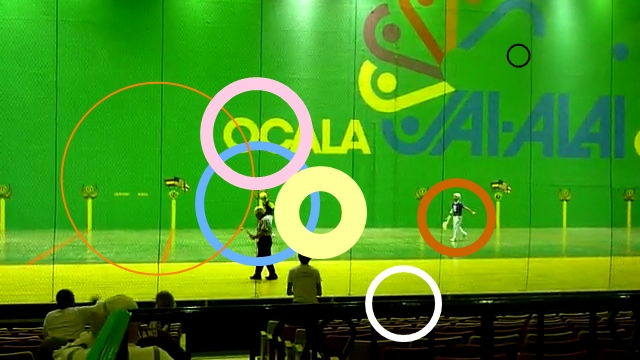
1,593 2010-10-01 20:58:24
Topic: Experimental version - 0.8.10 (4 replies, posted in General)
This is an experimental version : it needs your feedback to improve itself.
The installer is [s]available here[/s]. Go check 0.8.11 instead  .
.
Most important things in this version:
Circle tool
When you click on a circle drawing, you will see a change of color in the lower right part of the circle. You can drag this zone to change the size of the circle.
"Total milliseconds" time representation
In addition to the classic time or the "number of frames" you can now use this purely numerical time representation.
Some fixes were done in the capture department, but image flickering during save for Vista and 7 is apparently still here. (use the dedicated thread for capture related stuff)
Windows 7 users : if you have activated the "medium - 150%" or "big - 200%" option in "Control Panel > Display", you'll experience some problems in the user interface.
This is in progress. In the meantime, the only known work around is to go back to "small - 100%".
Snapshot: Some circles.
1,594 2010-09-22 21:47:00
Re: rotate the view of the videos (7 replies, posted in General)
Hello,
You can convert the file beforehand in VirtualDub.
Once the video is loaded, you go to Video > Filters, button "Add…", then select "rotate" or "rotate2" and click OK.
To save back the video, you can select a codec in Video > Compression… and then save with File > Save as Avi…
1,595 2010-09-20 13:27:29
Topic: Experiments (Chronophotography and other visual effects). (3 replies, posted in General)
I will try to document my efforts to implement chronophotography and other advanced visual effects in this thread.
There is a long road before any of these makes it up in Kinovea, but an important milestone was reached this week-end so I create the thread.
The first step of almost all these effects is to compute the motion of the camera.
This is equivalent to computing how to transform each frame so it looks like as much as the previous frame as possible, and do it for all the frames in the sequence.
The transformation parameters can be combined together, so basically at this point we can map each frame on the first frame of the sequence.
We can visualize the frames boundaries and compute the total size of the background.
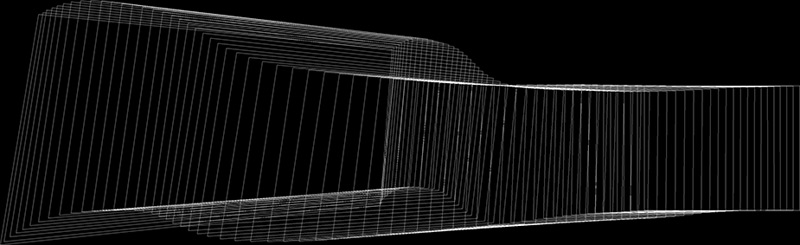
Frame borders transformed and positionned against the virtual background. (high jump sequence same as below)
.
The second step is to compute an image of the panoramic background without the person moving in the foreground.
To do this we compute back all the contributing images to a given location in the final background. This gives a list of pixels each from a different frame of the video, most being of the color of background, some being the person when passing in foreground. The trick is to compute a pixel representative of the background using this group of pixels.
For this experiment, I used the median pixel of the group. It gives good results and it's easy to compute.
Here are some reconstructed backgrounds (with some pictures extracted from the corresponding videos for reference).
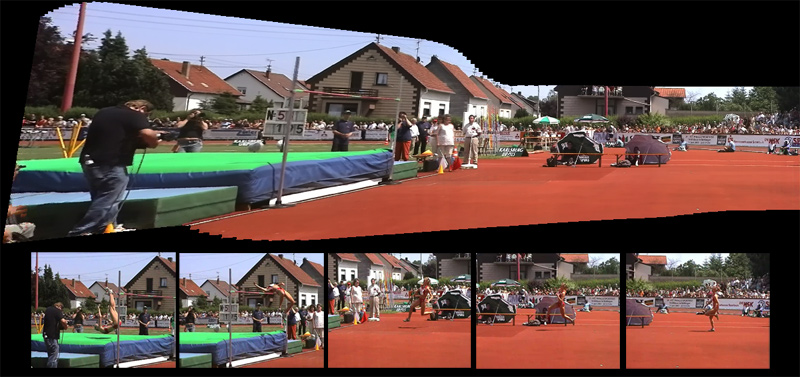
High jump sequence. Distorsion accumulates on the left.
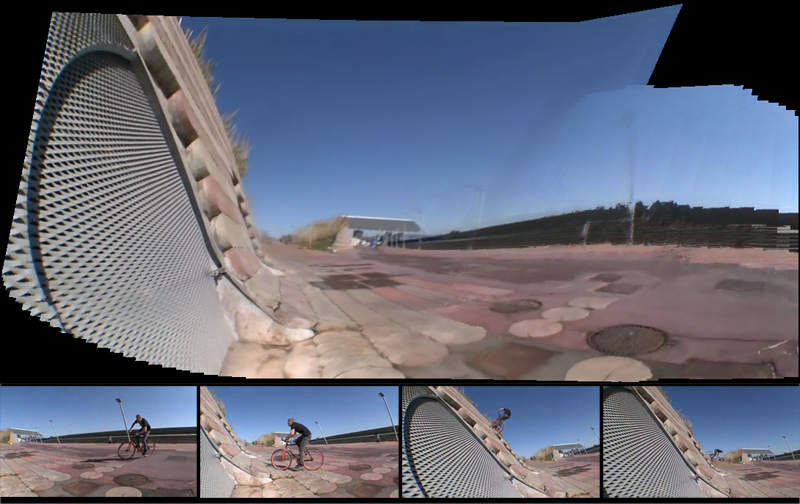
Fixed-gear bicycle sequence.
.
To be continued…
1,596 2010-09-19 23:18:57
Re: saving combined video and data images with slow motion feature (4 replies, posted in Bug reports)
This should be fixed in the next release.
1,597 2010-09-19 23:15:00
Re: [Capture] - How should it work ? (45 replies, posted in Ideas and feature requests)
Hi,
It's sounds like an interesting use case (and challenging ) However I thinks it's important to make sure the capture screen is robust enough and well functioning in its current implementation before attempting other sources.
(Maybe check LongoMatch software, he just added capture too during the summer. He is using a somewhat more versatile library for capture, maybe it already does network sources… And it is more tailored towards team sports too)
1,598 2010-09-19 23:03:49
Re: Weightlifters love this software (8 replies, posted in General)
It's not possible yet.
Currently only the lines and angles are exported (in addition to keyframes themselves, stopwatches and path tracks).
I'll try to add the markers in a future version.
1,599 2010-09-16 09:49:40
Topic: Issues with .NET 4.0 or 3.5 ? (1 replies, posted in Bug reports)
Hi,
There are two issues in the bug tracker related to issues with .NET 4.0.
If I understood correctly, the .NET 4.0 is only an incremental upgrade of the .NET framework, you can't just have it alone, it still needs the older versions to work.
And when you install the older versions, Kinovea should work properly…
Most especially if you get the message "unable to find a version of the runtime to run this application." it would mean the .NET 2.0 needs to be (re)installed.
(I'm not clear whether the .NET 3.5 can be installed alone and if it can run Kinovea on its own.)
Please report success or failure for the various combinations: .NET 3.5 alone (if possible), .NET 4.0 with older versions, others.
Thanks !
1,600 2010-09-16 09:23:48
Re: saving combined video and data images with slow motion feature (4 replies, posted in Bug reports)
Hi,
Can you confirm that this happens only for lower slow motion values ? (Try with 15~20%, and then with 50%, does it fail in the first case only ?).
edit: created bug 221.
1,601 2010-09-16 09:14:35
Re: Track Path settings (6 replies, posted in Bug reports)
litch09 wrote:
Another option that might work is that if the mouse button is held down for a period and dragged out then this would allow the size of the box to be set from the outset.
Hmm, this may interfere with the manual moving of the box ? (when manually adjusting the tracked point)
1,602 2010-09-15 10:42:46
Re: Track Path settings (6 replies, posted in Bug reports)
litch09 wrote:
Is there a way of adjusting the bounds that tracking algorithm searches in to prevent this from happening?
Currently this is not possible without changing the source code.
The feature window is computed to be 5% of the image size and the search window is 20%. I agree that the ability to tweak this is desirable.
As often the hard part will be to introduce this possibility without disrupting the general flow of using the default values.
One way might be to have a "hot" lower right corner on the outter search window that would be draggable (maybe with a little hint as for the magnifier window).
(This would increase or decrease both the feature window and the search window though, keeping the ×4 factor between the two. I have tried software where both rectangles can be sized (i.e: Adobe After Effects), and I find it rather hard to manage…)
Or maybe it would make more sense that this dragging would only change the outter window (?)
In any cases, I'm thinking that this possibility should have to be enabled explicitely from the configuration window. This way the default behavior is untouched and the user doesn't risk changing the size of the window when he just want to move it around. (which is very annoying when it happens).
litch09 wrote:
Also, would it be possible to add a feature which calculates the angle between three points. This might be embedded in the angle tool, so that the three points which define the angle can all be tracked at once. Just a thought.
Yes that would be great. It is on the to-do list, but nothing have been done yet.
1,603 2010-09-14 17:39:09
Topic: Interesting effect : MoFrames (0 replies, posted in Ideas and feature requests)
I just stumbled upon this page:
MoFrames, making movement complexity visible. (Martin Hilpoltsteiner)
If I understood correctly, he is taking the individual images of the person and put them one after the other in a 3D space, then render the view from various angles.
It gives pretty interesting results to grasp volumes used during the action !
Here is a person jumping on a trampoline.
(There are plenty more on the site)

1,604 2010-09-12 23:32:27
Re: [Capture] - How should it work ? (45 replies, posted in Ideas and feature requests)
daww wrote:
I recieved today a casio exilim fh100 (high speed camera), I haven't been able to use the capture feature with it?
Are you aware of a way to use it? by forcing the directshow?
I don't think these cameras can do direct streaming can they ? Do they have a "webcam" mode ?
If you find a way (any way) to display on the PC screen what the camera is currently imaging, please share program/method used. (I honestly don't know if it's feasible or not).
Thanks
1,605 2010-09-09 14:55:35
Re: How to accuratly use the magnifier glass? (1 replies, posted in General)
Yes, I agree the magnifier should better integrate with the drawing tools.
I would like to use this thread to gather ideas about what could be done in this area.
If I understand correctly, what you suggest for a start is:
- when drawing on top of the magnifier glass, the drawing should not register to the global image underneath, but should relate to the magnified area.
- the mouse cursor should change to reflect this and to give a more precise pointing tool.