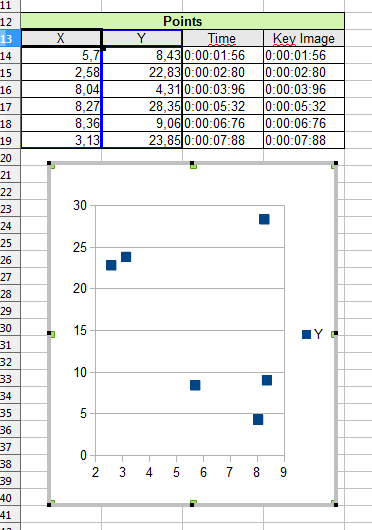
There is one piece of architecture that was introduced in version 0.8.17 that would make this much easier to implement than before.

I think what is needed to go forward on this topic is to settle on a data format. Converting the raw data into graphics shouldn't be too difficult.
What is the most common data format for timed values ? Plain old CSV ?

1,052

(22 replies, posted in General)

wermouth wrote:

Unfortunately video synchronize video doesn't work well sad

Could you elaborate on what doesn't work well ?

wermouth wrote:

I would love to see what was in v15 or 14 that you can play two videos with different speed

Are you comparing a high speed camera video with a normal one or is it another scenario ?

1,053

(7 replies, posted in Français)

Hmm, hm!

D'après ce que je comprends il y a un périphérique de capture appelé Asus GSB d'installé sur la machine. Apparemment c'est un périphérique virtuel de capture d'écran qui est installé automatiquement avec les cartes graphiques Asus…
Comme il apparaît en premier, par défaut, Kinovea essaie de se connecter dessus. Et là ça plante pour une raison que j'ignore.

En cherchant plus d'infos je suis tombé sur des messages de gens qui avaient le même problème avec ce pilote Asus GSB sur d'autres logiciels de capture vidéo. Par exemple ici avec Skype.

Un contournement suggéré dans ce lien est d'aller dans le gestionnaire de périphériques, sous Contrôleurs audio, vidéo et jeu, et désactiver le périphérique virtuel Asus.
À voir si ça marche… En attendant de comprendre plus précisément le problème.

1,054

(7 replies, posted in Français)

Bonjour,

Quel est le message d'erreur ?
Si c'est avec la version 0.8.18 je serais intéressé par récupérer les logs pour analyser le problème. (Après le plantage et avant redémarrage de Kinovea, aller dans "C:\Users\<nom d'utilisateur>\AppData\Roaming\Kinovea" et copier les fichiers log.txt et autres Unhandled Crash.txt).

Quel est le modèle de camescope/webcam ? La même caméra fonctionne sur le portable et pas sur le fixe ?

Il y a un bug ouvert - 272 - qui correspond au problème, mais je ne le reproduis pas. Les logs seraient donc d'une grande aide pour le diagnostic (les attacher directement au bug si possible).

1,055

(3 replies, posted in Bug reports)

The issue was that the drawings were drawn in the "display" coordinate system even when recording or taking a snapshot. But when recording we always use original size, so when original and display sizes differed, the drawings were misplaced.

It'll be fixed in the next version.

1,056

(3 replies, posted in Bug reports)

It's probably a bug, I'll try to reproduce it. Is the camera resolution higher than what fits in the screen ?

1,057

(2 replies, posted in Français)

Oui, JPEG, PNG, BMP et GIF sont supportés.

1,058

(22 replies, posted in General)

Thanks for the fast feed back !
I'll have a look into the regression on angles as soon as possible.
The grid was previously accessible from the main menu and the shortcut was actually defined on the menu. The menu has been removed so there's no shortcut anymore. I'll definitely look into a more general system to map shortcuts to tools.

And thanks for the support !

1,059

(7 replies, posted in Français)

Version expérimentale, merci de remonter toutes les regressions éventuelles !

Installeur: Kinovea.Setup.0.8.19.exe

Le topic annonce sur le forum anglais.

1,060

(22 replies, posted in General)

Experimental version feedback needed ! wink
Beware of regressions and report anything suspicious. Do not assume the issue is known.

Installer: [s]Kinovea.Setup.0.8.18.exe[/s] Too late! Go check 0.8.19 instead.


New tools
This version is all about new tools. Here is a quick glance at the new tool bar:

http://www.kinovea.org/screencaps/0.8.x/toolbar.0.8.18.png

To access the extra tools on a button, you simply do a long click on the button. (Similar to Adobe Photoshop and other softwares).
The arrow tool has been separated from the line tool for easier access.
Here is a quick summary of the new tools.

http://www.kinovea.org/screencaps/0.8.x/newtools.0.8.18.png

- Auto numbers: to add numbered items. Each time you use it, the number increments.
- Goniometer: lets you measure an angle relatively to a reference angle of 0°, 45°, 90°, etc.
- Posture: lets you check alignments of the body for various sports. The vertical side lines move symmetrically relatively to the center line, the head circle moves up and down, the shoulder line is free, etc.
- Bike fit: for bike fit.
- Profile: to quickly sketch alignments.
- Genu: to quickly sketch the general posture of the lower body. Should be useful for podiatrists. (The name comes from genu flexum, genu recurvatum, etc.)
- Archery top view: as the name implies this one is tailored for archery. the dashed line corresponds to the shoulder line as seen from above.
- Spotlight: puts the focus on an area, dim the rest. See in action.

SHIFT modifier
The shift modifier can be used to constraint how the handles moves. For many tools this will constraint a line to be rotated by 45° jumps relatively to its parent line.
For the pencil tool, it will draw horizontal or vertical lines. For the grid tool, it will constraint to a square.

But wait, there's more
All the tools under the goniometer menu are dynamically loaded from XML description files. This is the core innovation of this version. A generic system to describe, parse and render interactive tools.

The idea in the back of my head here is that in addition to the built-in tools, you'd be able to design your own tools, perfectly tailored to your sport or exercise. This has always been a pet peeve of mine, with the Observational Reference system also in this vein, but here I think it'll be more practical.

Currently it's somewhat crude, you have to create an XML file manually describing the tool and how it behaves. But it's doable (if you know the format).
I'll later write a tutorial on how to create your own tool. And maybe if there's enough demand, I think it'd be possible to have an WYSIWYG editor to create interactive tools.
In the meantime, you can play, copy and alter the files under the "DrawingTools" directory of the installation path. The files in this directory will be automatically loaded in the interface.

If you have a request for a specific tool that you think can be implemented under this system, don't hesitate to post the request on the forum. It'll be an opportunity to show how to do it and hopefully as many users as possible become knowledgeable in this part of the program and can help others and report new ideas to make it even more powerful.

And more
On top of this, please welcome the Czech locale and the Korean locale ! Woohoo, thanks to  Ji?í Rosický and Rak Joon Sung!


Go grab it ! smile

1,061

(1 replies, posted in Bug reports)

First of all, just in case it works in your scenario, you can save the analysis data independently from the video itself. This is the preferred way to go in new versions. Save the analysis in a separate kva file, and use the original footage. The data will be loaded back when reopening the file in Kinovea.
Saving the video itself should only be used for export, for example to upload to youtube or something. Even if it's to share with someone, it's better to send the original video and the .kva file separately.

If this is not possible, try to convert the original video to another format in a conversion software first. (VLC may be able to do it for example). I think the issue with saving is only on certain input formats (mp4 ?) so converting it first to mpeg or avi might fix the problem.

You can also try with the experimental version 0.8.17, although I doubt it will fix the issue, it's more recent and the player has been improved. It also has logs enabled by default, so it'll be easier to diagnose the problem.
(However the data format has changed, so work you do on 0.8.17 may not be entirely read back in 0.8.15)

1,062

(26 replies, posted in General)

marchello wrote:

1. Question.: I'm using GPS logger. And i would like to put the "speed" datas and the video together. So i want to see the video and actual speed in the same time. I'm using kinovea for skiing. Anyone any idea, how could i do that? If its not possible with Kinovea than some other program?

Sorry for being so late to reply.
Do you (or someone else interested in this) have a sample file of the data output by the GPS logger ?
I can't promise anything but the ability to import data logs to overlay and synchronize them on the video is a recurring request.

Actually even better would be if someone could study the various formats existing, if there is a de facto standard, if there is utilities to convert between them, if there is a generic format for data logs outside of GPS theme, etc.

Great stuff !
Thanks for sharing big_smile

1,064

(1 replies, posted in Bug reports)

Thanks, I reproduce the problem. The code that deactivates the keyboard handling is only run when the dialog pops up, I'll see what can be done.

1,065

(7 replies, posted in Bug reports)

The original issue (in this thread at least) was due to a bug in the specific mode of saving where you save the analysis data embedded in the video file as a stream. If you didn't use this feature it must be a different issue. In the new versions, it's only possible to save the analysis as a separate file, partly to avoid this type of problems.